
For YOU account holders a Split IBAN allows you to automatically share your incoming payments with a partner, agent, or affiliate—without needing to make manual transfers. This guide walks you through what Split IBANs are, how they work, and how to set them up inside your Yoursafe account.
What Is a Split IBAN?
A Split IBAN is a dedicated account number in your name that automatically divides any incoming funds according to a pre-set percentage between you and a chosen third-party beneficiary. This feature is especially useful for creators, influencers, or professionals who share income with agencies, agents, or marketing partners.
Key Highlights
- Automatic Splitting: Incoming funds are automatically divided between you and your beneficiary.
- Flexible Setup: You can choose any percentage split up to 50% for the beneficiary.
- Guaranteed Accuracy: Funds are distributed instantly upon arrival, ensuring timely and transparent payments.
- Free to Create: There’s no fee for creating or maintaining a Split IBAN. Regular transaction fees apply for incoming and outgoing transfers.
Important Rules
- Maximum Split: You can assign up to 50% of each incoming payment to a third party.
- Transaction Fees: Standard fees apply to all automatic payments to third-party beneficiaries.
- Non-changeable Setup: Once created, neither the beneficiary nor the split percentage can be modified.
- Returned Payments: Funds sent to invalid or deleted Split IBANs will automatically return to the sender.
- Beneficiary Accounts: It’s more cost-efficient if your beneficiary also uses a Yoursafe account.
- Accuracy Check: Verify all beneficiary details before finalizing, to prevent returned transactions.
You can always review your active Split IBANs at https://splitiban.yoursafe.com.
How to Create a Split IBAN
- Log In: Sign in to your Yoursafe account and navigate to Accounts → Create your own IBAN.
-
Choose “Split/IBAN”: Under the “Automate your payments” section, select Create your Split/IBAN.
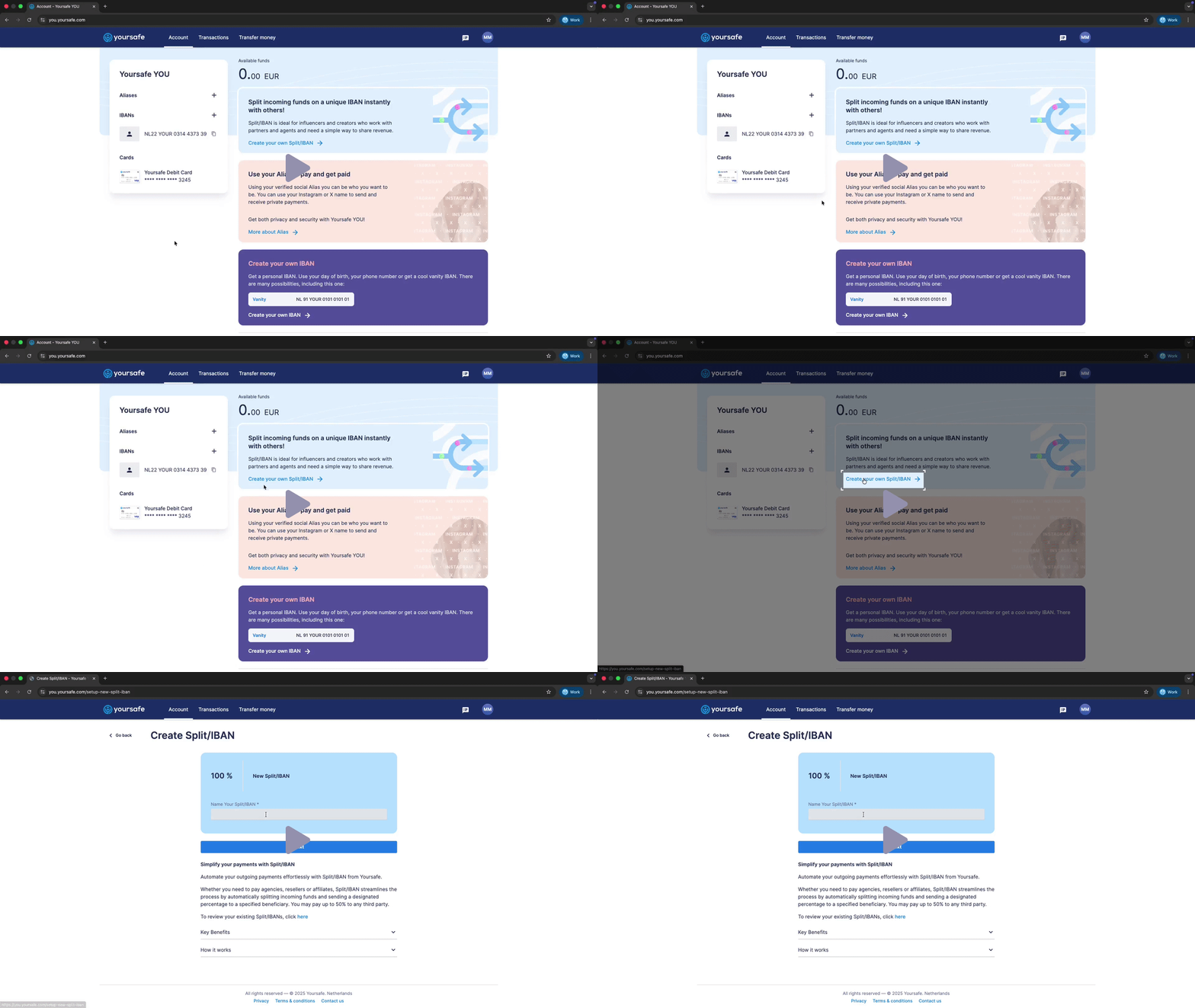
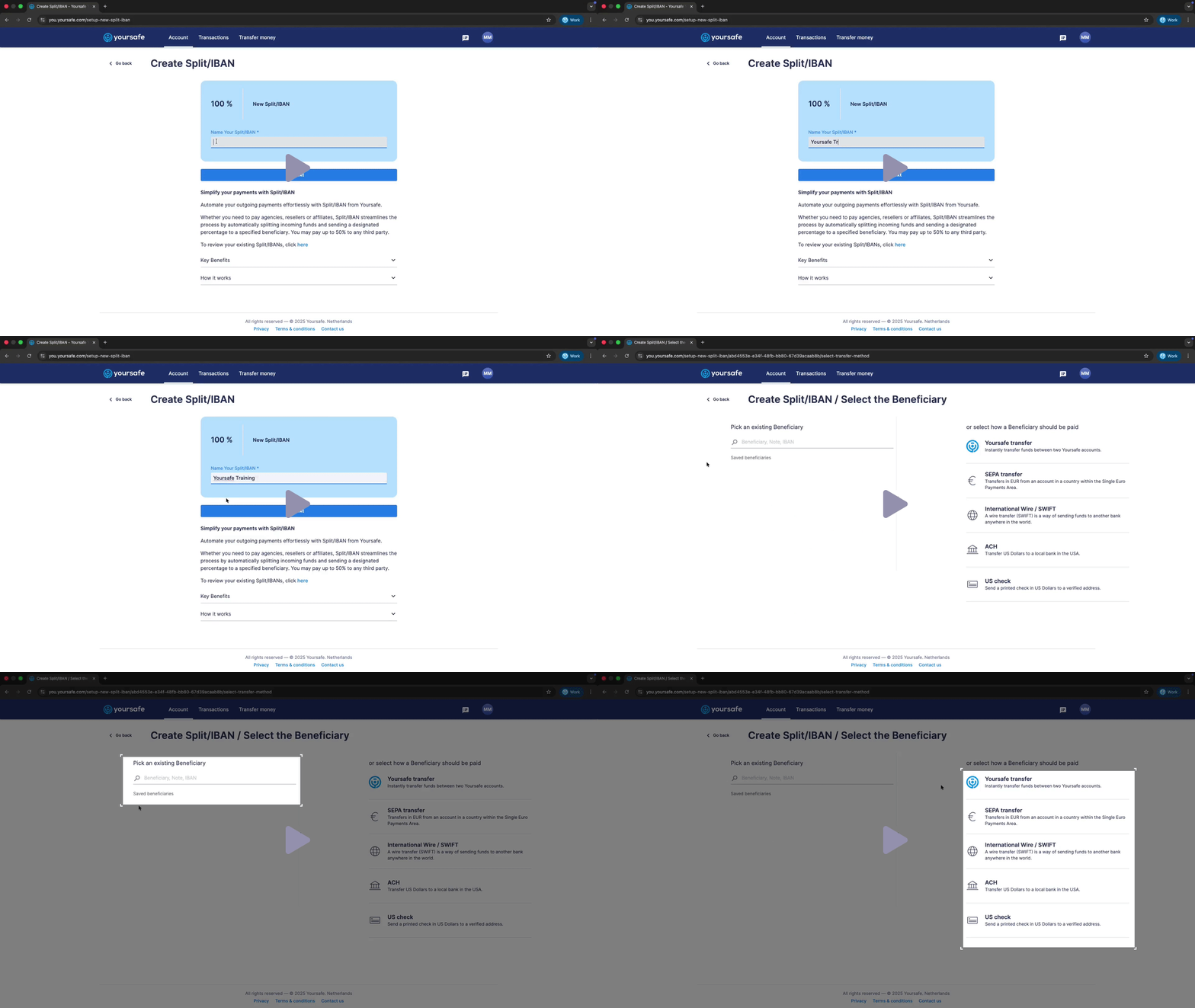
- Name Your Split IBAN: Give your new Split IBAN a recognizable name (e.g., Agency Revenue or Affiliate Partner).
-
Add Your Beneficiary: Choose from your existing beneficiaries or add a new one by entering their full name and IBAN. You can select either Yoursafe Transfer (instant and free between Yoursafe accounts) or SEPA Transfer (for EU bank accounts).
- Set the Split Percentage: Decide what portion of your incoming funds goes to the beneficiary (up to 50%). The remaining percentage automatically stays in your main Yoursafe account.
- Review and Confirm: Carefully review all details and agree to the Split IBAN Power of Attorney and Terms & Conditions, then click Confirm.
- Finish Setup: Once confirmed, your Split IBAN is ready! A confirmation screen will show your new IBAN, your share, and your beneficiary’s share. Your beneficiary will also receive a verification link via email.
How It Works
From now on, whenever funds are sent to your new Split IBAN:
1. Yoursafe automatically splits the payment according to your configuration.
2. Your portion goes directly to your primary account.
3. Your beneficiary’s portion is transferred to their designated account automatically.
All transactions are logged in your Yoursafe dashboard for full transparency.
Verifying a Split IBAN
You can verify any existing Split IBAN by visiting splitiban.yoursafe.com and entering the IBAN. The verification page displays the Split IBAN number, the owner’s IBAN, and the beneficiary’s IBAN and percentage split.
Need Help?
If you have questions or run into any issues setting up your Split IBAN, please contact our Customer Support Team via the chat in your Yoursafe app or email accounthelp@yoursafe.com
Comments
0 comments
Please sign in to leave a comment.